How to Automate Lead Generation with n8n
This complete guide shows you exactly how to automate lead generation with n8n, step by step. Whether you are new to n8n or already using it, this guide on how to automate lead generation with n8n will help you build a system that runs 24/7.
If your sales team is still copying leads from LinkedIn into spreadsheets, you are losing hours every week that could be spent closing deals. In 2026, manual lead generation is not just slow – it is a competitive disadvantage.
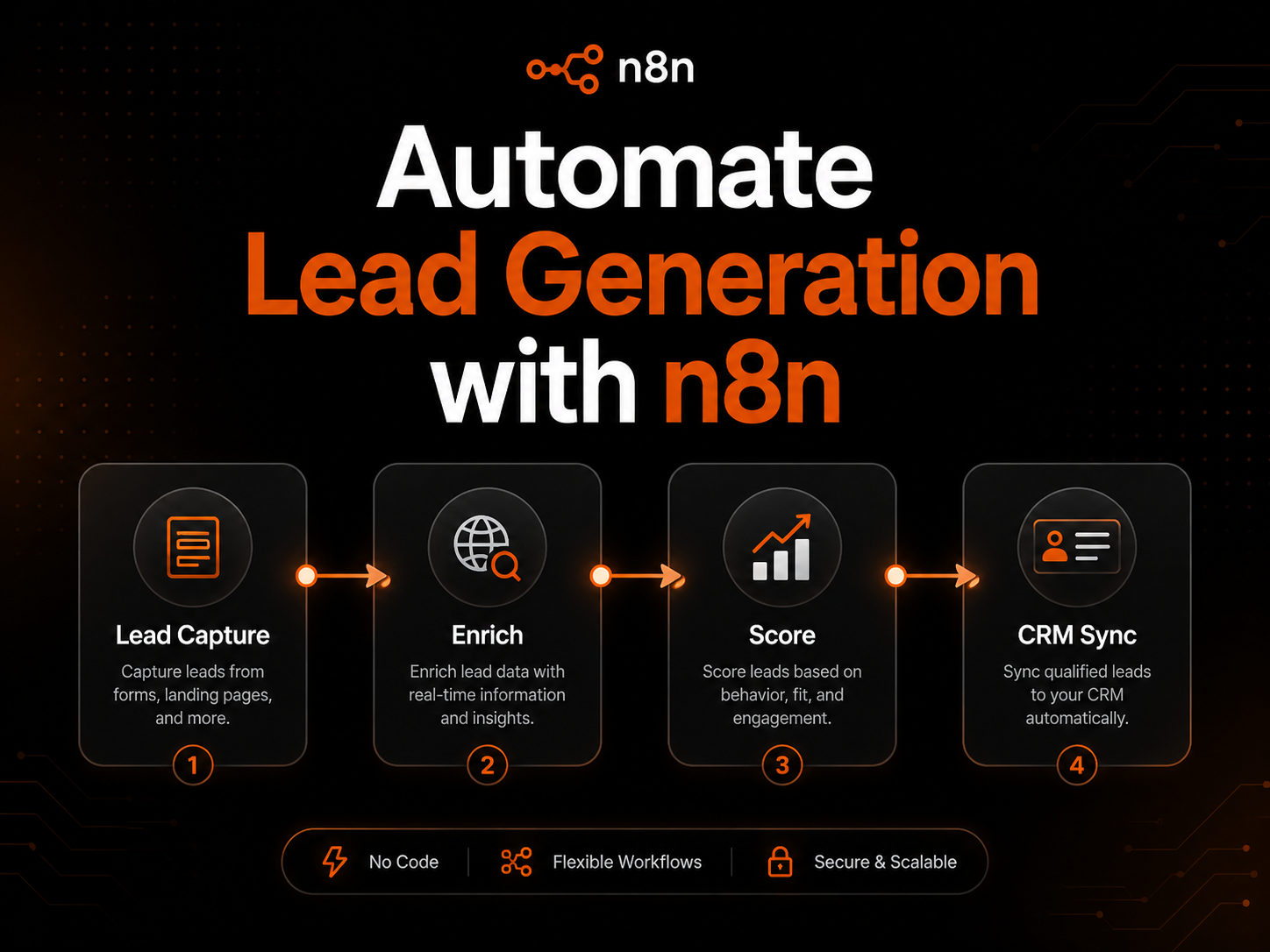
automate lead generation with n8n lets you build a fully automated system that captures, enriches, scores, and syncs leads to your CRM — without writing a single line of code.
What Is n8n and Why Should Indian Businesses Use It?
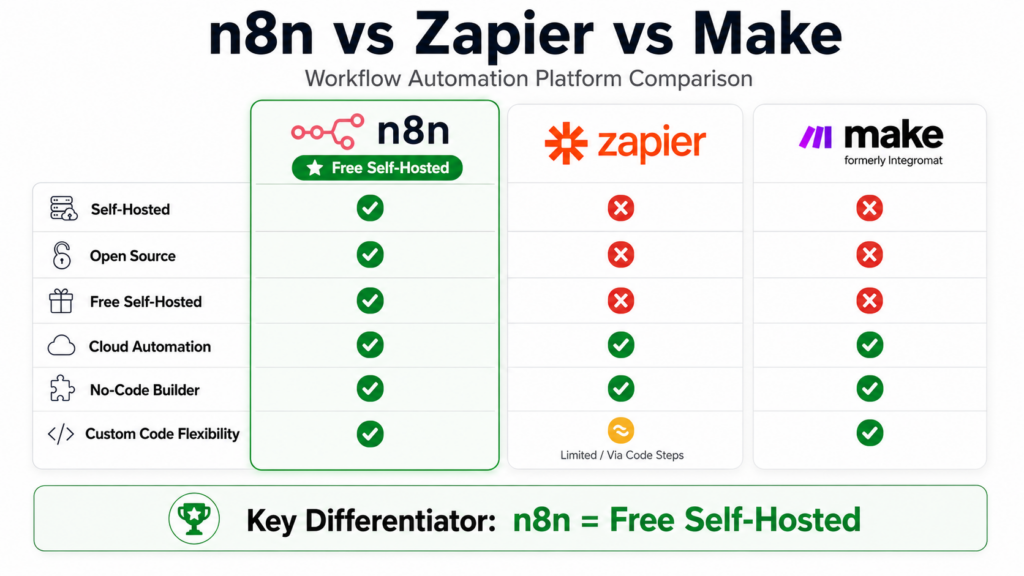
n8n (pronounced “n-eight-n”) is a free, open-source workflow automation tool that connects your apps, APIs, and databases through a visual drag-and-drop editor. Think of it as a smarter, more flexible alternative to Zapier or Make – but with one major advantage: you can self-host it on your own server, which means no monthly per-contact fees.
For Indian businesses, n8n offers three massive advantages:
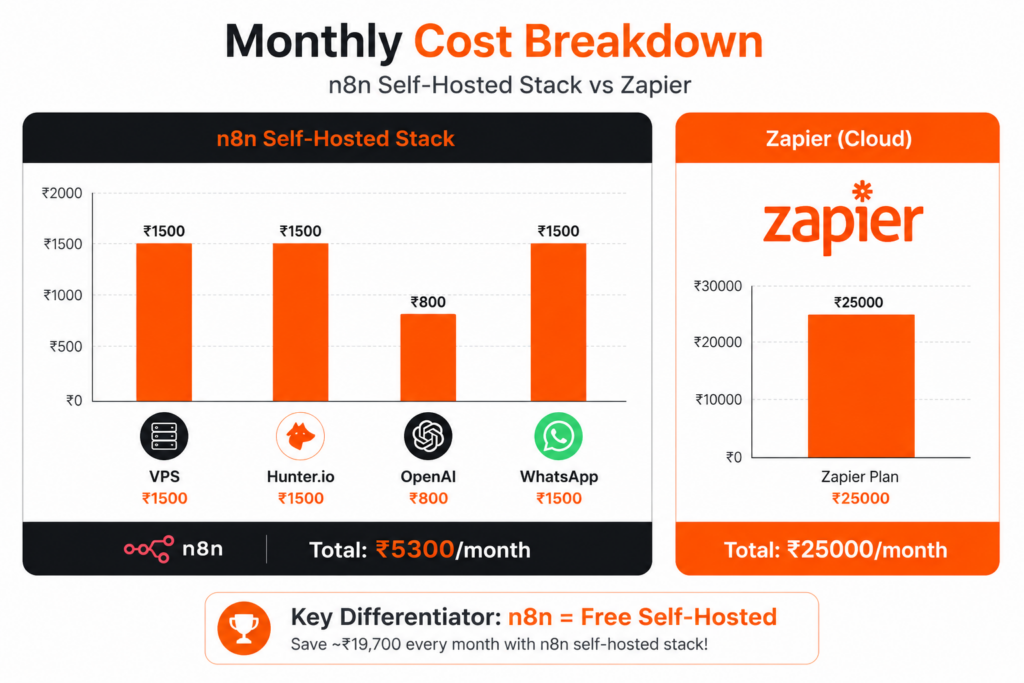
Cost advantage: Zapier charges ₹8,000–₹25,000/month for high-volume automation. n8n self-hosted is free. You only pay for your server — which can be as low as ₹500/month on a VPS.
Full data control: Your lead data stays on your own server. No third-party storing your prospect information.
Indian stack compatibility: n8n integrates natively with WhatsApp Business API, Google Sheets, Razorpay, Zoho CRM, and hundreds of tools popular with Indian businesses.
The 4-Stage n8n Lead Generation System
Every effective automated lead generation workflow has four stages. Here is how each stage works inside n8n:
Stage 1: Lead Capture
This is where raw prospect data enters your pipeline. In n8n, you set up a trigger node that fires every time a new lead arrives. Common trigger sources include:
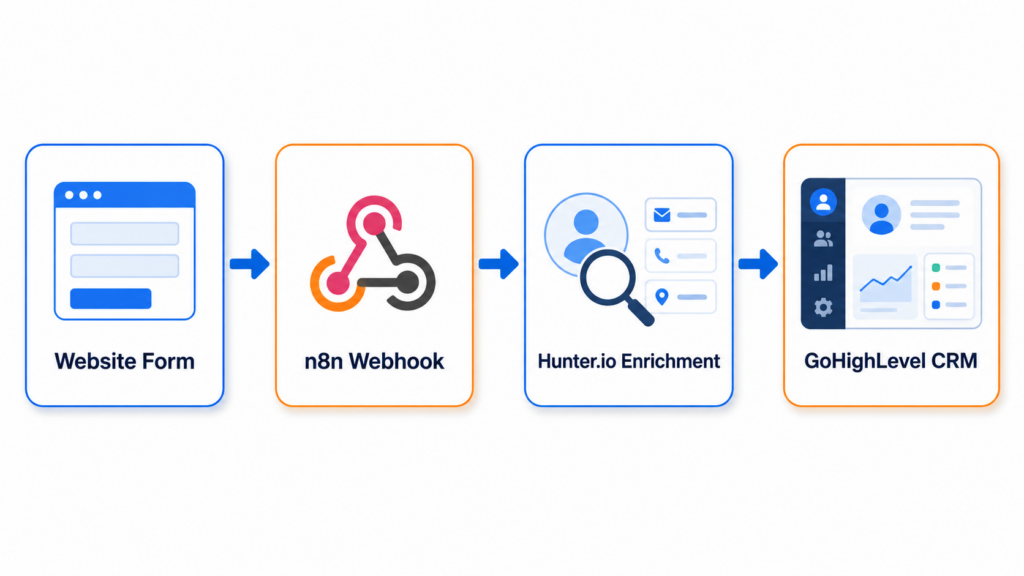
- Website contact forms — n8n Webhook node captures form submissions in real time
- Facebook and Instagram Lead Ads — n8n connects directly to Meta’s Lead Ads API
- Google Ads Lead Form Extensions — sync leads automatically via Google Sheets or webhook
- WhatsApp inquiries — using WhatsApp Business API with n8n
- LinkedIn outreach responses — via Phantombuster + n8n HTTP Request node
- Inbound calls — using Retell AI or VAPI voice agents connected to n8n
Stage 2: Lead Enrichment
Raw leads often contain just a name and email. Enrichment adds company name, job title, phone number, LinkedIn profile, and company size automatically. In n8n, you connect enrichment tools using the HTTP Request node:
- Hunter.io — finds verified email addresses from domain names
- Apollo.io — enriches leads with company data and contact details
- Clearbit — adds firmographic data like revenue and employee count
- Google Maps API — perfect for local business lead generation in India
Here is a practical example for Indian B2B businesses: A lead submits your contact form with just their name and company website. n8n automatically sends the domain to Hunter.io, gets the verified email, checks Apollo.io for their LinkedIn profile and job title, and stores everything in your CRM — in under 10 seconds.
Stage 3: Lead Scoring and Qualification
Not every lead deserves the same follow-up. n8n’s AI nodes (powered by OpenAI or Claude) can automatically score each lead based on your criteria:
- Company size above 50 employees → High priority
- Budget mentioned in inquiry → Immediate follow-up
- From target industries (real estate, e-commerce, SaaS) → Priority queue
- Incomplete information → Nurture sequence
Stage 4: CRM Sync and Follow-Up
Once a lead is captured and enriched, n8n automatically pushes it to your CRM and triggers follow-up actions:
- GoHighLevel — creates a contact, assigns to a pipeline stage, and triggers an email sequence
- HubSpot — creates a deal, assigns to a sales rep, and sends a Slack notification
- Zoho CRM — creates a lead record with all enriched data filled in
- Google Sheets — for businesses not using a CRM yet
Step-by-Step: Build Your First n8n Lead Generation Workflow
Step 1: Set Up n8n
You have two options:
n8n Cloud (Easiest): Sign up at n8n.io. Free trial available. Paid plans start at approximately $20/month.
Self-hosted (Most cost-effective for India): Install n8n on a VPS. A ₹500/month Contabo or Hostinger VPS works perfectly.
Step 2: Create a Webhook Trigger
- Open n8n → New Workflow
- Add node → Search “Webhook”
- Set method to POST
- Copy the webhook URL
- Paste this URL in your website contact form’s action field
Step 3: Add Lead Enrichment
- Add node → HTTP Request
- Set URL to Hunter.io API endpoint
- Add your Hunter.io API key
- Map the domain field from your webhook data
Step 4: Score the Lead with AI
- Add node → OpenAI
- Set model to gpt-4o-mini
- Add scoring prompt based on your ICP criteria
- n8n returns a score for every lead automatically
Step 5: Route to CRM
- Add node → IF (condition: score > 7)
- True branch → GoHighLevel: Create Contact
- False branch → Google Sheets: Add to nurture list
Step 6: Notify Your Team
- Add node → Slack or WhatsApp Business
- Send real-time notification with lead details and score
- Sales team gets full context instantly — no manual checking
Advanced n8n Lead Generation Workflows To successfully automate lead generation with n8n , you need to understand these four core stages that every workflow must have.
Workflow 1: Google Maps Lead Scraper
Perfect for Indian businesses targeting local B2B clients. This workflow takes a search query like “digital marketing agencies in Mumbai”, scrapes Google Maps via SerpAPI, extracts business name, phone, website and address, enriches with Hunter.io for email, and adds everything to GoHighLevel CRM with tags. Result: 50–100 qualified local business leads per day, fully automated.
Workflow 2: Facebook Lead Ads to WhatsApp
Extremely effective for Indian consumer businesses. Facebook Lead Ad fires when someone submits. n8n captures name, phone, email instantly. WhatsApp Business API sends a personalised message within 30 seconds. Studies show responding to leads within 5 minutes increases conversion by 9x. This workflow responds in under 30 seconds.
Workflow 3: LinkedIn to CRM Pipeline
For B2B agencies and service businesses: Phantombuster scrapes LinkedIn profiles matching your ICP. n8n receives data via webhook, Hunter.io finds verified email, OpenAI writes a personalised cold outreach email, n8n sends via Gmail, and lead status is logged in Google Sheets automatically.
n8n vs Zapier vs Make: Which Should Indian Businesses Use?
| Feature | n8n | Zapier | Make |
|---|---|---|---|
| Pricing | Free (self-hosted) | ₹8,000+/month | ₹4,000+/month |
| Self-hosting | Yes | No | No |
| Data control | Complete | Third-party | Third-party |
| AI nodes | Built-in | Limited | Limited |
| Indian tool support | Excellent | Good | Good |
| Best for | Growing businesses | Beginners | Mid-size teams |
How Much Does n8n Lead Generation Cost for Indian Businesses?
| Item | Monthly Cost |
|---|---|
| VPS (Contabo/Hostinger) | ₹500–₹1,500 |
| Hunter.io (500 searches) | ₹1,500 |
| Apollo.io (free tier) | ₹0 |
| OpenAI API (1,000 leads) | ₹800 |
| WhatsApp Business API | ₹1,000–₹2,000 |
| Total | ₹3,800–₹5,800/month |
Common n8n Lead Generation Mistakes to Avoid
Mistake 1: No error handling. Always add an error handler node after API calls. If Hunter.io is down, your workflow should continue — not fail completely.
Mistake 2: Not deduplicating leads. Add a check before creating CRM contacts. n8n’s Google Sheets node or CRM lookup handles this easily.
Mistake 3: Skipping lead scoring. Without scoring, your sales team wastes time on low-quality leads. Even a simple 3-field scoring rule makes a huge difference.
Mistake 4: Manual follow-up. Connect your CRM to an email sequence so follow-up happens automatically within minutes of lead capture.
Final Thoughts
Automating lead generation with n8n is one of the highest-ROI investments an Indian business can make in 2026. The setup takes a few hours. The results — consistent, enriched, scored leads delivered to your CRM 24/7 — compound every single month.
If you are ready to build your n8n lead generation system but want expert help setting it up, Qreo Digital specialises in n8n automation for Indian and global businesses. We have built lead generation workflows for real estate, e-commerce, SaaS, and service businesses — fully customised to your tech stack.
Book a free strategy call and we will map out your complete lead automation system in 30 minutes.
Frequently Asked Questions
Is n8n free?
n8n is free to self-host. Cloud-hosted plans start at approximately $20/month. For Indian businesses, self-hosting on a VPS is the most cost-effective option.
Can n8n connect to WhatsApp?
Yes. n8n connects to the official WhatsApp Business API, enabling automated messages, lead notifications, and follow-up sequences.
How long does it take to set up n8n lead generation?
A basic webhook-to-CRM workflow takes 30–60 minutes. A full multi-stage system with enrichment and scoring takes 1–2 days.
Does n8n work with GoHighLevel?
Yes. n8n has native HTTP Request support for GoHighLevel’s API, enabling full CRM integration including contact creation, pipeline management, and workflow triggers.
Is n8n better than Zapier for Indian businesses?
For cost and data control, yes. n8n self-hosted is free and keeps your lead data on your own server — critical for businesses handling sensitive client information.
Real Results: What Indian Businesses Achieve with n8n Lead Automation
Here are realistic outcomes businesses see within the first 90 days of implementing an n8n lead generation system:
Real Estate Agency — Hyderabad
A mid-size real estate agency was manually collecting leads from 4 different sources — their website, Facebook Ads, MagicBricks, and 99acres. Their sales team spent 3 hours daily just consolidating leads into a spreadsheet. After implementing n8n, all four sources feed into a single GoHighLevel pipeline automatically. Lead response time dropped from 4 hours to under 2 minutes. Qualified lead volume increased by 340% in 60 days — not because they spent more on ads, but because no lead was missed or delayed.
E-Commerce Brand — Delhi
A D2C skincare brand running Facebook and Instagram Lead Ads was losing leads because their sales team could only follow up during business hours. n8n connected their Lead Ads directly to WhatsApp Business API. Every new lead gets a personalised WhatsApp message within 45 seconds — at any time of day or night. Their lead-to-consultation conversion rate improved from 12% to 31% within 45 days.
B2B SaaS Company — Bangalore
A SaaS company offering HR software was struggling with lead quality. Their sales team was spending equal time on enterprise prospects and students exploring free trials. After implementing n8n’s AI lead scoring — using company size, LinkedIn job title, and inquiry type as scoring criteria — their sales team now focuses exclusively on leads scoring 7 or above. Sales cycle shortened by 28% and revenue per sales rep increased by 45% in the first quarter.
How to Choose the Right n8n Lead Generation Setup for Your Business
Not every business needs the same n8n configuration. Here is a practical framework to choose the right setup based on your current stage:
Stage 1: Just Getting Started (0–50 leads/month)
If you are generating fewer than 50 leads per month, start with a simple webhook-to-Google-Sheets workflow. No CRM needed yet. n8n captures every lead, stores it in a Google Sheet, and sends you a WhatsApp notification. Total setup time: 1 hour. Total monthly cost: under ₹1,000.
Stage 2: Growing Business (50–500 leads/month)
At this stage, add a CRM (GoHighLevel or Zoho), basic lead enrichment via Hunter.io, and automated email follow-up sequences. n8n handles the routing between all three systems. Your sales team works from a single CRM dashboard instead of juggling multiple tools. Setup time: 1–2 days. Monthly cost: ₹3,000–₹6,000.
Stage 3: Scaling Business (500+ leads/month)
At scale, add AI lead scoring, multi-channel outreach sequences, deduplication logic, and advanced reporting dashboards. n8n becomes your central automation hub — connecting ads platforms, enrichment APIs, CRM, email, WhatsApp, and analytics in a single workflow system. Setup time: 3–5 days. Monthly cost: ₹5,000–₹10,000. Value delivered: easily 10–50x the cost in saved labour and improved conversion.
Getting Started with n8n Today: Your Action Plan
Here is a simple action plan to go from zero to a working n8n lead generation system this week:
- Day 1: Sign up for n8n Cloud free trial or set up a self-hosted instance on a VPS. Connect your website contact form via webhook.
- Day 2: Connect your CRM — GoHighLevel, HubSpot, or Zoho. Test the webhook-to-CRM flow end to end.
- Day 3: Add Hunter.io enrichment for email verification. Add a WhatsApp notification for your sales team.
- Day 4: Add OpenAI lead scoring. Set up IF conditions to route high and low priority leads differently.
- Day 5: Connect your Facebook and Instagram Lead Ads. Test the complete end-to-end flow with a real test lead.
- Day 6–7: Monitor, fix edge cases, and add error handling nodes. Your system is now live and running 24/7.
Seven days from today, your business will have a lead generation system that works while you sleep. Every lead captured, enriched, scored, and followed up — automatically.
Need help setting this up faster? Book a free 30-minute strategy call with Qreo Digital — India’s n8n automation specialists based in Uttarakhand, serving clients worldwide.
